Upload files using the Sharepoint API and Python
Before you start
- An Azure App has been created. If you haven't done so already, follow the instructions here.
- Install the Dataplane pip package (https://pypi.org/project/dataplane/) by adding
dataplaneto requirements.txt file. For further instructions, check how to Update Python packages under Docs > Getting Started > Create a data pipeline. - Sharepoint permissions assigned. Guidance to assign permissions here.
Overview
This recipe shows how to Upload an Excel file to Sharepoint. In this example, the Excel file has been created by a Pandas Dataframe. You can also read an Excel from a directory and upload that file to Sharepoint using a similar method.
tip
This method is not suitable for large files where the file size cannot fit inside memory. For example, you are working on a docker container with 2GB memory and the CSV you are trying to upload is 5GB. There is a method to upload large files in small chunks and we will release that function with documentation soon.
Upload Excel using Sharepoint API and Python in Dataplane's code editor
If you are new to Dataplane, learn how to use Dataplane's code editor.
from dataplane import sharepoint_upload
import os

# ------- Create the Excel file ----------
import pandas as pd
from io import BytesIO

data = {
  "calories": [420, 380, 390],
  "duration": [50, 40, 45]
}

# Load the data into a DataFrame object:
df = pd.DataFrame(data)

UploadObject = BytesIO()
df.to_excel(in_memory_file)

# ----- Upload the the Excel file to Sharepoint -----
Host = os.environ["secret_dp_sharepoint_host"]
TenantID = os.environ["secret_dp_azure_tenant_id"]
ClientID = os.environ["secret_dp_azure_client_id"]
Secret = os.environ["secret_dp_azure_client_secret"]

rs = sharepoint_upload(Host=Host,
TenantID=TenantID,
ClientID=ClientID,
Secret=Secret,
SiteName="DataplaneDemo",
TargetFilePath=SharepointFilePath,
UploadObject="/UploadedFiles/myexcelfile.xlsx",
UploadMethod="Object"
)

if rs["result"]!="OK":
    print(rs)
Reading an Excel file from a directory
Change this part to read the file from a directory instead of creating an Excel file from Pandas.
# Get the current directory path
CURRENT_DIRECTORY = os.path.realpath(os.path.dirname(__file__))
print(CURRENT_DIRECTORY)

FileSize = os.path.getsize(CURRENT_DIRECTORY+"/myexcelfile.xlsx")
print("File size dir:", FileSize)
UploadObject = open(CURRENT_DIRECTORY+"/myexcelfile.xlsx", 'rb').read()


rs = sharepoint_upload(Host=Host,
TenantID=TenantID,
ClientID=ClientID,
Secret=Secret,
SiteName="DataplaneDemo",
TargetFilePath=SharepointFilePath,
UploadObject="/UploadedFiles/myexcelfile.xlsx",
UploadMethod="Object"
)

if rs["result"]!="OK":
    print(rs)
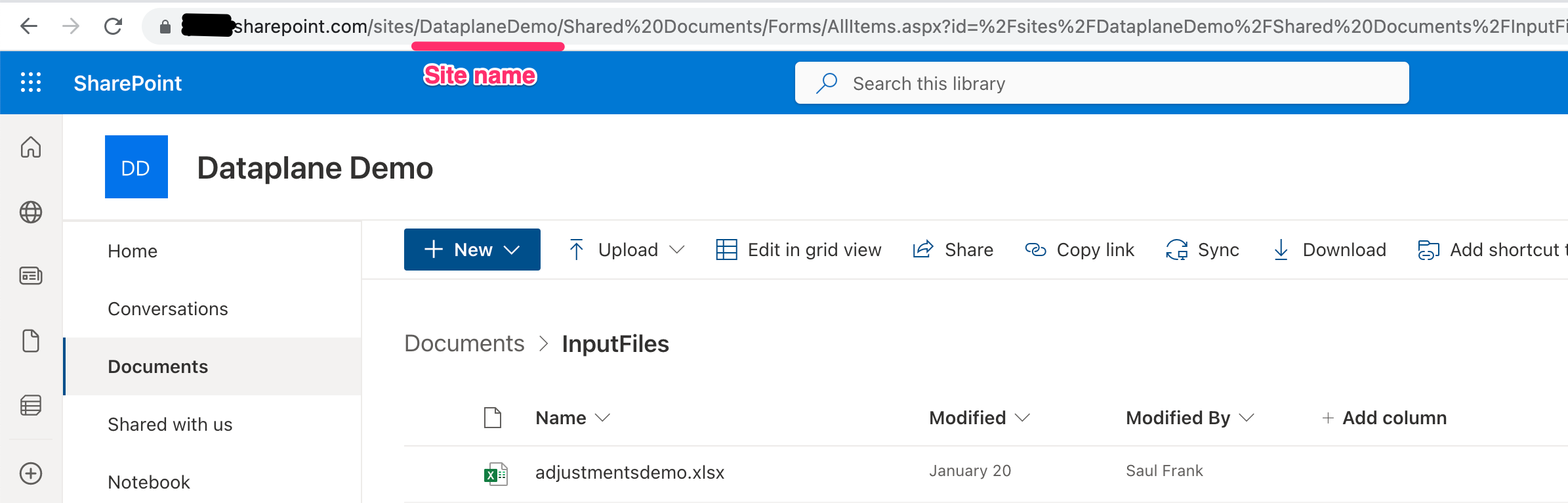
Where to get the site name of your Sharepoint site
SiteName = "DataplaneDemo"